Client-Side vs Server-Side Integration
Overview
There are currently two different ways to integrate Digital Experience Personalization products into your site; Client Side or Server Side. Both options have benefits and drawbacks.
Understanding the way each of the two implementation methods works are important, no matter which product from the ADA lineup you are implementing.
Retailers wants to work closely with their ADA team to get the most out of their implementation. While many features are self-service, taking advantage of the ADA team and the training provided helps to avoid hiccups in implementation.
ADA ingests data from the retailer in various Feeds that it uses to recommend products, show content, or return in search/browse results for end users in placements on the retailer's website, using a complex mix of strategies, rules and an engine that continuously works to display the most relevant recommendations in real time.
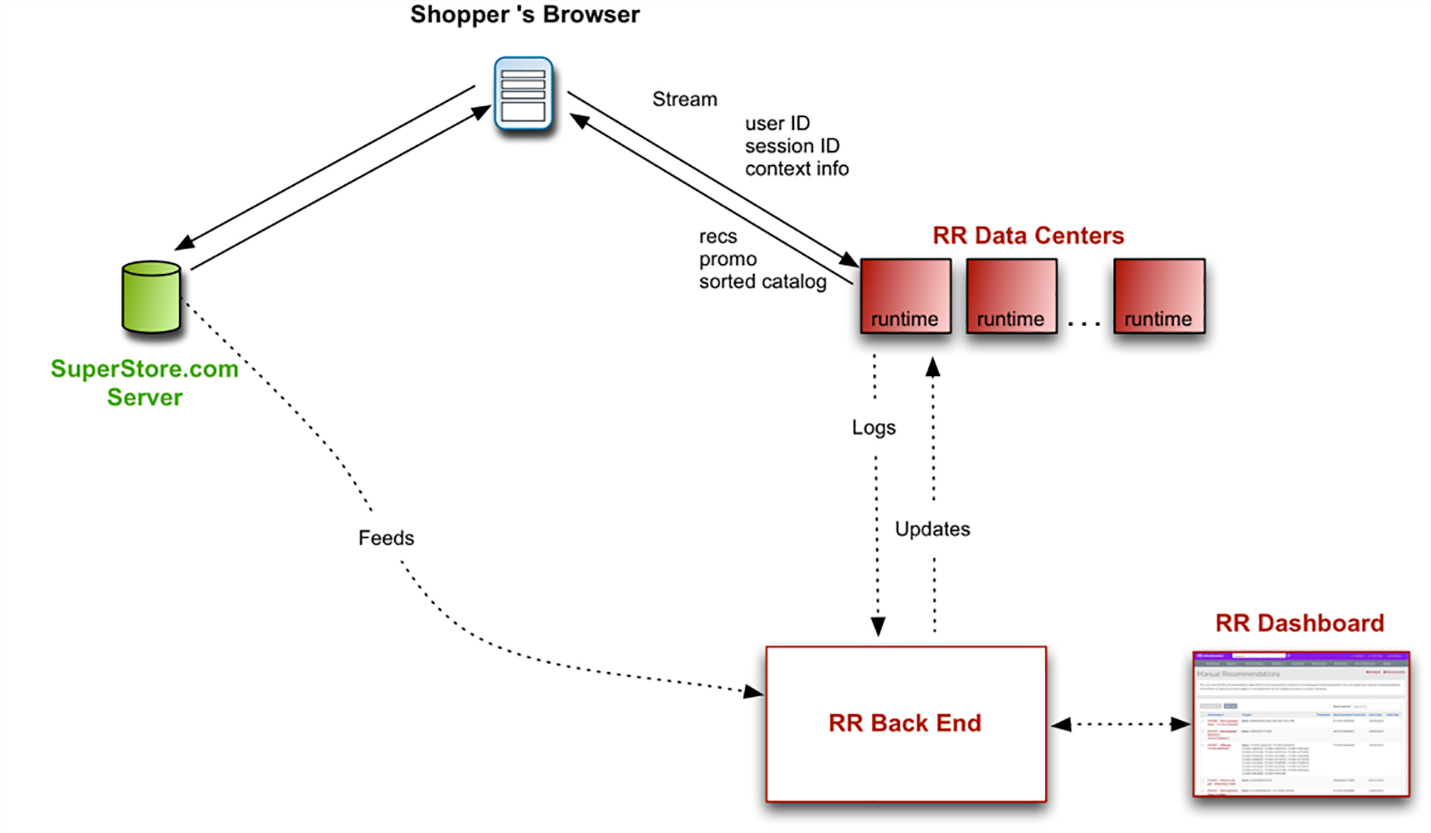
When a customer visits a site that uses a ADA product, the site sends information about the customer and the site to the Digital Experience Personalization and receives personalized content in return. This call to the Digital Experience Personalization and the response can be made from the customer’s browser (which we call a client-side request) or from the merchant’s server (a server-side request).
The ADA data center and the ADA back end communicate on a regular basis, bringing logs of user activity to the back end and updates to the runtime to the data centers. Each data center has an exact copy of the current runtime, so it doesn’t matter which data center is called from the browser.
More data comes to the ADA back end from feeds (catalog updates, offline purchase data, etc.). The Digital Experience Personalization dashboard also configures the back end. Changes from these sources propagate to the data centers through regular updates. (For example, a catalog update that came in through the feed will affect the recommendations in the runtime.)
Client Side vs. Server Side
Client Side
In a Client-Side implementation, the customer visits the client’s web site and the merchant’s server delivers a page that includes JavaScript code or an API that calls the Digital Experience Personalization server at one of our data centers. This call includes information about the user, which the Digital Experience Personalization uses to choose the best personalized information to show. The Digital Experience Personalization server sends this information back (including recommendations, promotions, and sorted catalog data) to the customer’s browser, either as HTML or JSON.
In a Client-Side integration setup, pages call the Digital Experience Personalization server from the customer’s browser, either through our JavaScript integration or a Client-Side API call:
Server Side
On the other hand, in a Server-Side setup, pages call the Digital Experience Personalization server from the retailer's server:
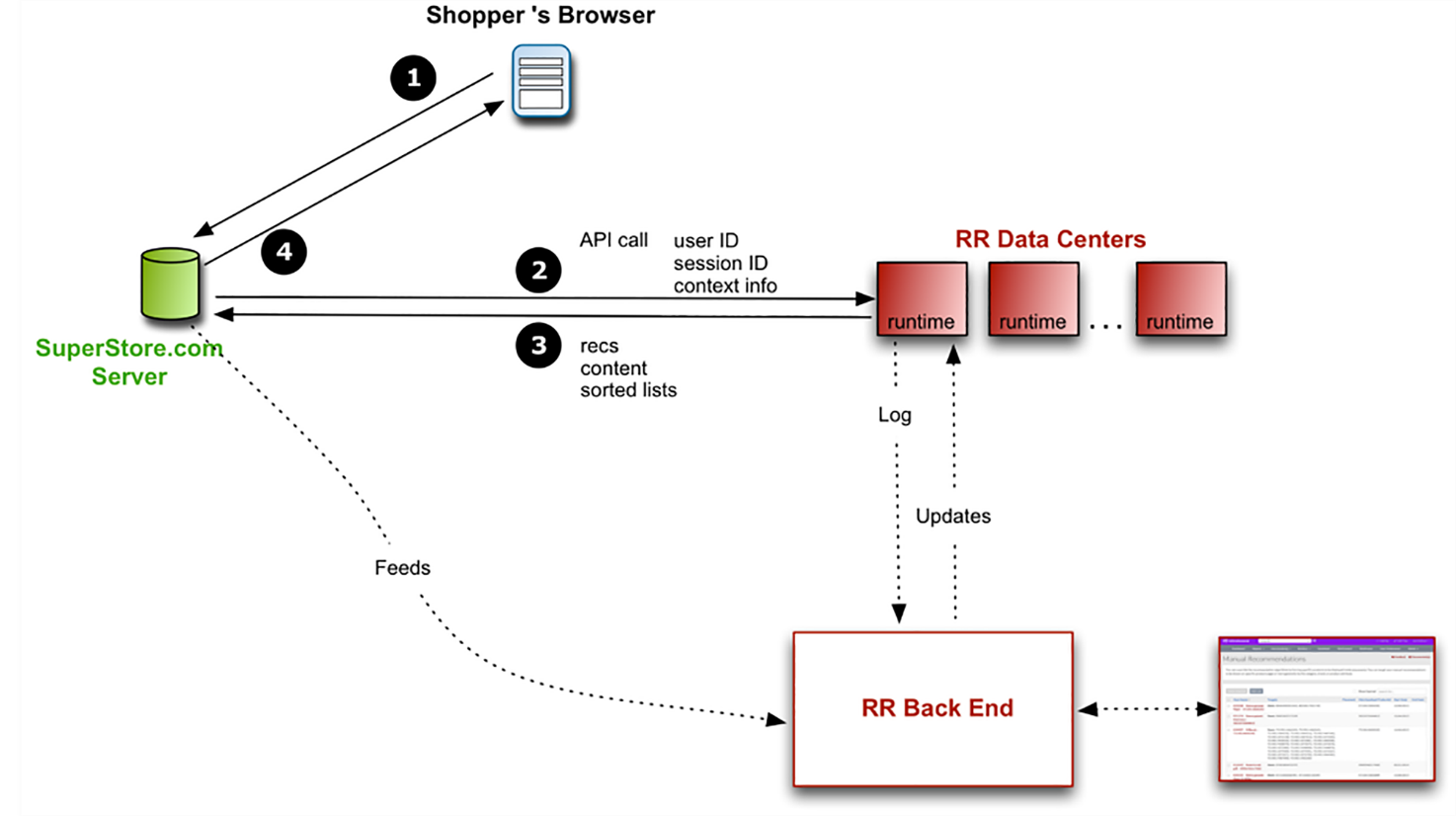
The choice will depend on the things that the retailer prioritizes, including speed of the implementation, the use of cookies and speed of page loads. Retailers should work with their ADA team to help them to make this decision.
Cookies
On the Client-Side implementations, the Digital Experience Personalization server creates cookies through the customer’s browser to record the customer’s views, purchases, recent search terms, and other information about the customer’s behavior. With every call to the Digital Experience Personalization server, this information is read from the cookie and used to personalize the customer’s experience.
To ensure that first party cookies are created you will want to create a new CNAME DNS record (e.g. recs.yoursitename.com) and point it to recs.richrelevance.com. This will ensure that any cookie created will be created as a first partly cookie.
Because cookies are features of the customer’s browser, cookies aren’t inherently part of server-side implementations. The Digital Experience Personalization server can’t create cookies if it’s not in direct contact with a browser.
Cookie Proxy
In server-side setups, merchants can effectively give the Digital Experience Personalization server access to the browser’s cookies by acting as a cookie proxy (or cookie pass-through). When the Digital Experience Personalization server requests a cookie, the merchant’s server requests the cookie through the customer’s browser. When the customer’s browser requests a page from the merchant site, the merchant’s server reads the ADA cookies and then passes this information to the Digital Experience Personalization server.
Vanity URLs
Cookies are domain-specific in a browser, so if the merchant website is called SuperStore.com, the cookies it creates will be available only to SuperStore.com. When recs.richrelevance.com creates cookies, those cookies are only available to richrelevance.com. By default, client-side calls to the Digital Experience Personalization server will not be able to see cookies created by the merchant server, and vice versa.
When these cookies are not shared between the two types of integrations, logging and reporting will be incorrect, and everything that the Digital Experience Personalization learns from user behavior can suffer as a result.
To share the cookies, you need to set up a sub-domain on your site (like recs.SuperStore.com), a CNAME reference, and the ADA Vanity URLs feature. The ADA cookies will be created under your site’s domain, and they can be accessed from your server-side as well as your client-side implementations. Refer to Vanity URLs.